XTRONSCustom fit
XTRONS IMH94MTVL
- Screen
- 9"
- OS
- Android 14
- CarPlay
- Yes
- Android Auto
- Yes
- RAM/ROM
- 8GB RAM + 128GB ROM
- Price
- ~$399.99
There's no shortage of stereo choices for a Nissan Armada — because it takes a standard double DIN chassis, the whole aftermarket is open to you. The trick is the supporting hardware: a Armada dash kit and wiring harness turn a generic unit into a factory-look install. Here's what we'd pick.
Some links on this page are affiliate links — see our affiliate disclosure.
A universal unit becomes a factory-look install with the right supporting parts. For the Nissan Armada that means:
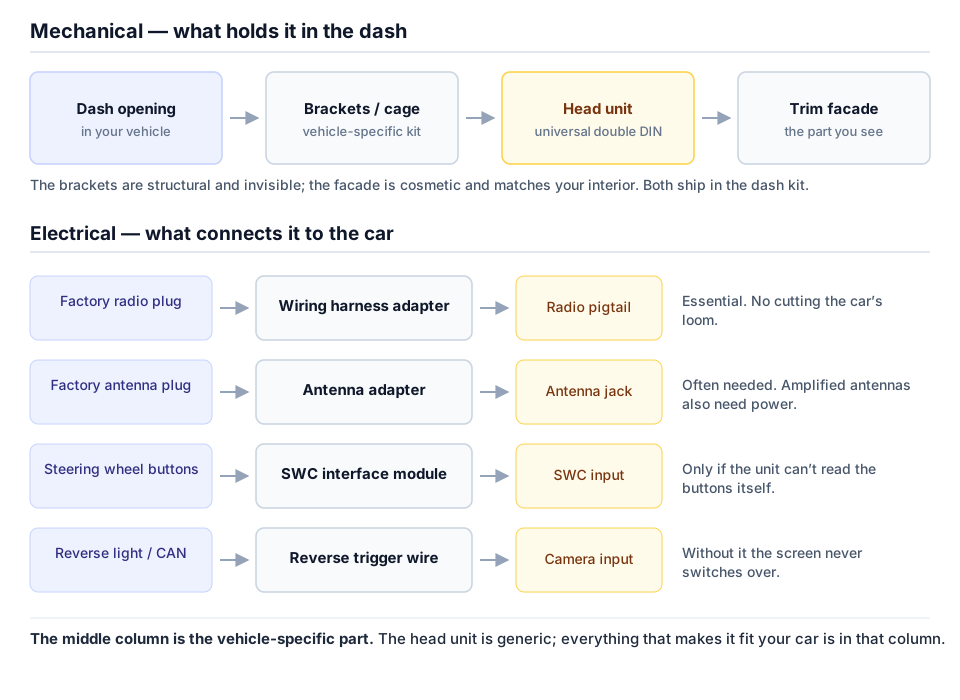
Adapts a standard double DIN chassis to the Nissan Armada dash opening for a factory-look fit.
Plugs between the new stereo and the factory Nissan connector — no cutting the car's wiring.
Connects the factory Nissan antenna plug to the standard motorola jack most aftermarket units use.
Keeps your steering wheel volume and track buttons working with the new unit.
Nearly every unit here has a rear camera input — adding a camera during the install costs little extra effort.
Yes — the Nissan Armada takes a standard double DIN (4-inch tall) chassis with the correct dash installation kit. The kit fills the factory opening so the new stereo looks factory-installed.
Yes — a vehicle-specific dash kit is the one part you shouldn't skip. It adapts the Armada dash opening to the standard double DIN chassis and usually costs $15–$50.
In most cases yes, with a steering wheel control interface module wired between the car and the new unit. Budget roughly $30–$60 for it.
Units listed for the Nissan Armada come with 7", 9", 11.6", 12.95" displays. Larger screens on custom-fit units are shaped to the dash, so a bigger display doesn't necessarily mean cutting or trimming.
A Armada head unit swap is a common DIY job: trim removal tools, a screwdriver set, and 1–2 hours are typically enough. The wiring is plug-in when you use the right harness adapter and dash kit. If you're not comfortable removing dash trim, any car audio shop can do the physical install for a modest fee.